
Release 26.3
This release brings Token Unlocks: an overview of upcoming unlocks, an unlock calendar, the largest cliffs, new issuance, and researched tokenomics for every token.
 Written by taika · Creator of Token Radar
 Highlights
- Token Unlocks: See which tokens unlock how much, and when, across the whole market
- Unlock Calendar: Find every unlock day by day in a heatmap and a full agenda
- Largest Cliffs: Follow the biggest one-time unlocks ahead
- Issuance: Compare the new supply tokens create through mining and staking
- Tokenomics Tab: Researched unlock schedules with price, allocations and sources
Token Unlocks Overview
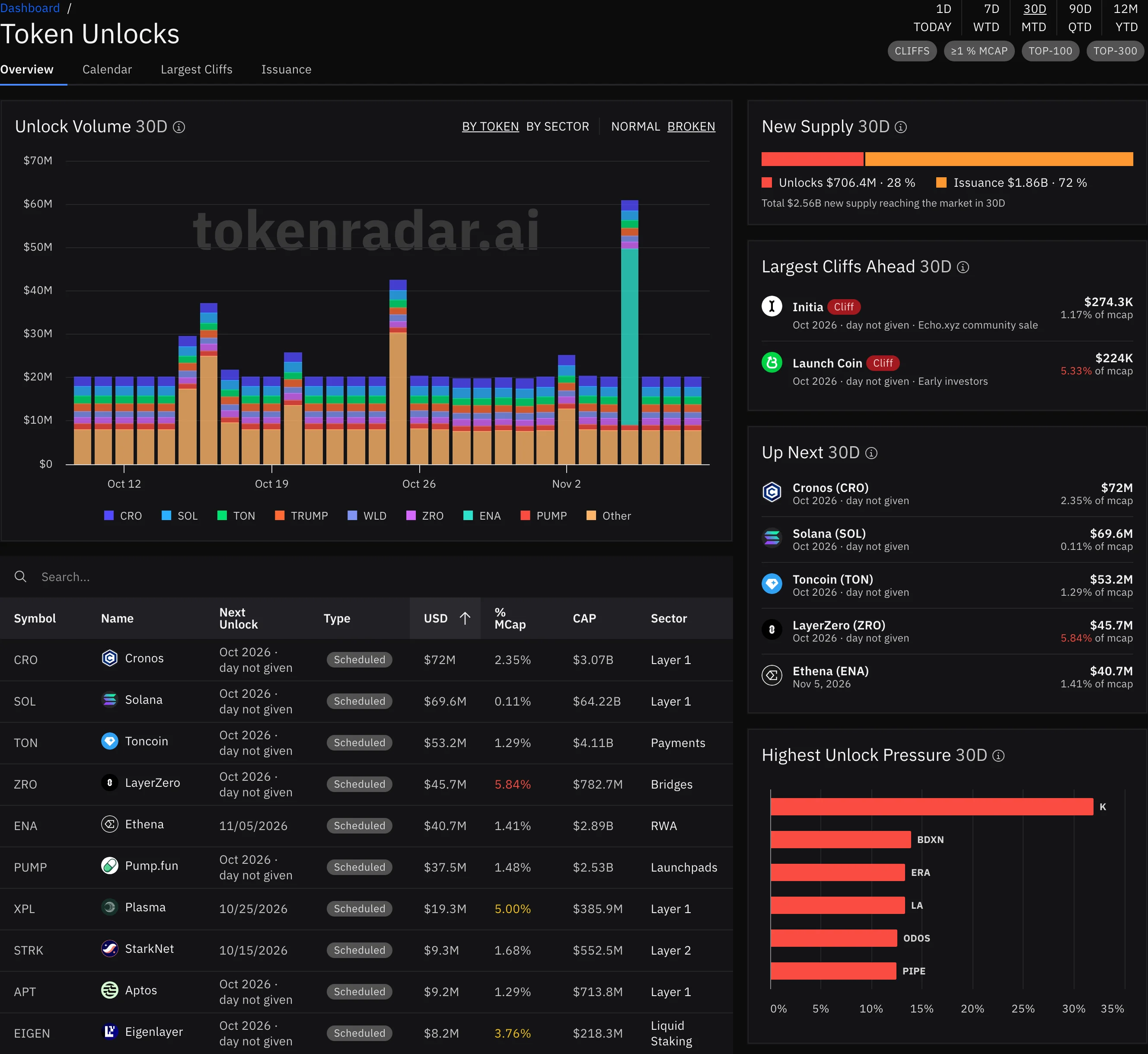
The new Token Unlocks page, under Unlocks in the side navigation, shows the upcoming unlocks of every token with an unlock schedule. The period at the top right drives the whole page, looking forward from today.
- Periods and Filters: Pick a period from 1D to 12M, or a period to date such as MTD, and narrow the page with CLIFFS, ≥1 % MCAP, TOP-100 and TOP-300
- Unlock Volume: The unlock value per day, BY TOKEN or BY SECTOR. BROKEN splits the axis so a single huge day does not flatten the rest. Click a token's column to open its tokenomics page
- Unlocks Table: Each token's next unlock with its type, USD value, share of market cap and sector. Shares from 2.5 % are yellow, from 5 % red
- New Supply: How much new supply reaches the market in the period, split into unlocks and issuance
- Largest Cliffs Ahead and Up Next: The biggest cliffs and the five largest upcoming unlocks, each with its share of market cap
- Highest Unlock Pressure: The tokens whose unlocks are the largest share of their market cap
The next 30 days are free for everyone. The other periods are part of Premium.
Unlock Calendar
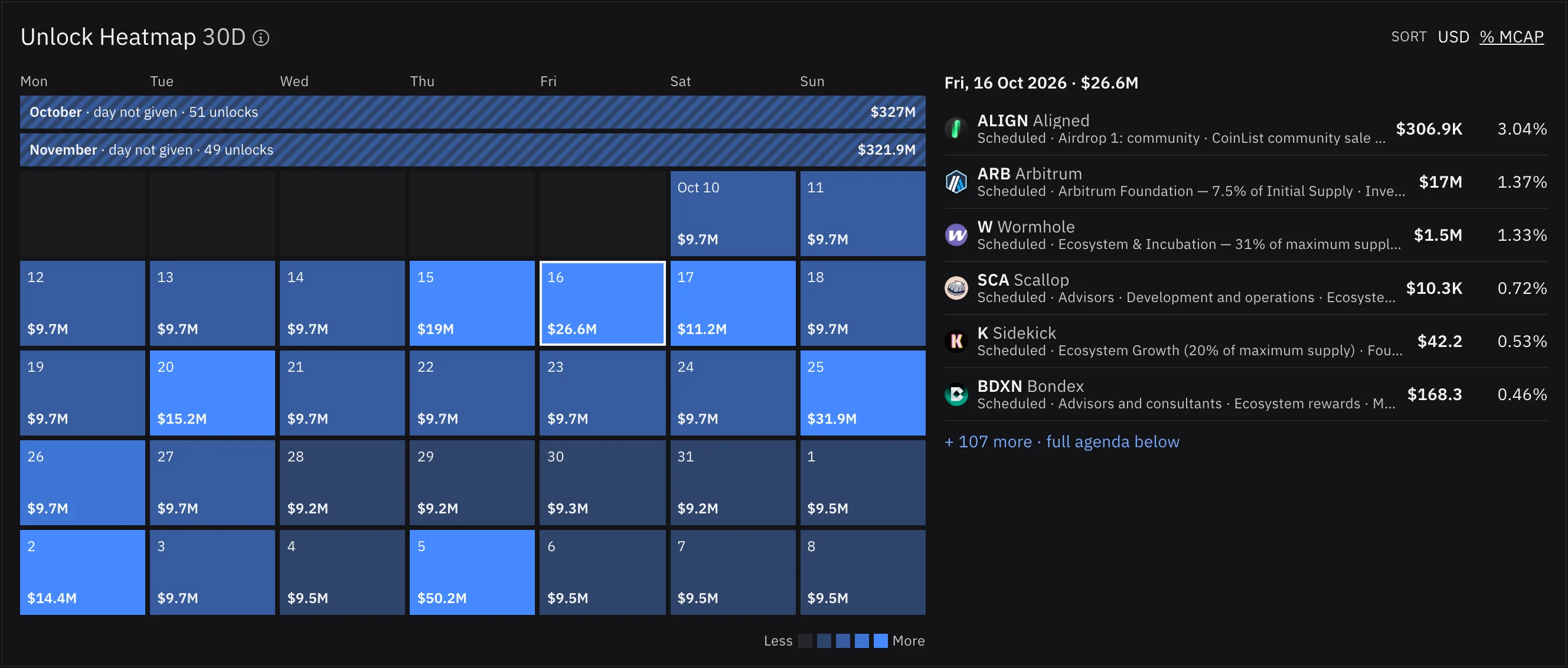
The Calendar tab lays out the unlocks of the selected period day by day.
- Unlock Heatmap: Each day's unlock value in USD, darker for larger days. Click a day to list its unlocks beside the heatmap, sorted by USD or by % MCAP
- Upcoming Unlocks: The full agenda, largest unlock first within a day. Filter it by type (CLIFF or SCHEDULED), by size (≥0.1, ≥1 or ≥5 % of market cap) or by token
- Day Not Given: When the sources only name the month of an unlock, the calendar shows it once, in a month lane above the days, marked "day not given", instead of inventing a date. Select the lane to list these unlocks; the agenda keeps them in their month's block
Largest Cliffs
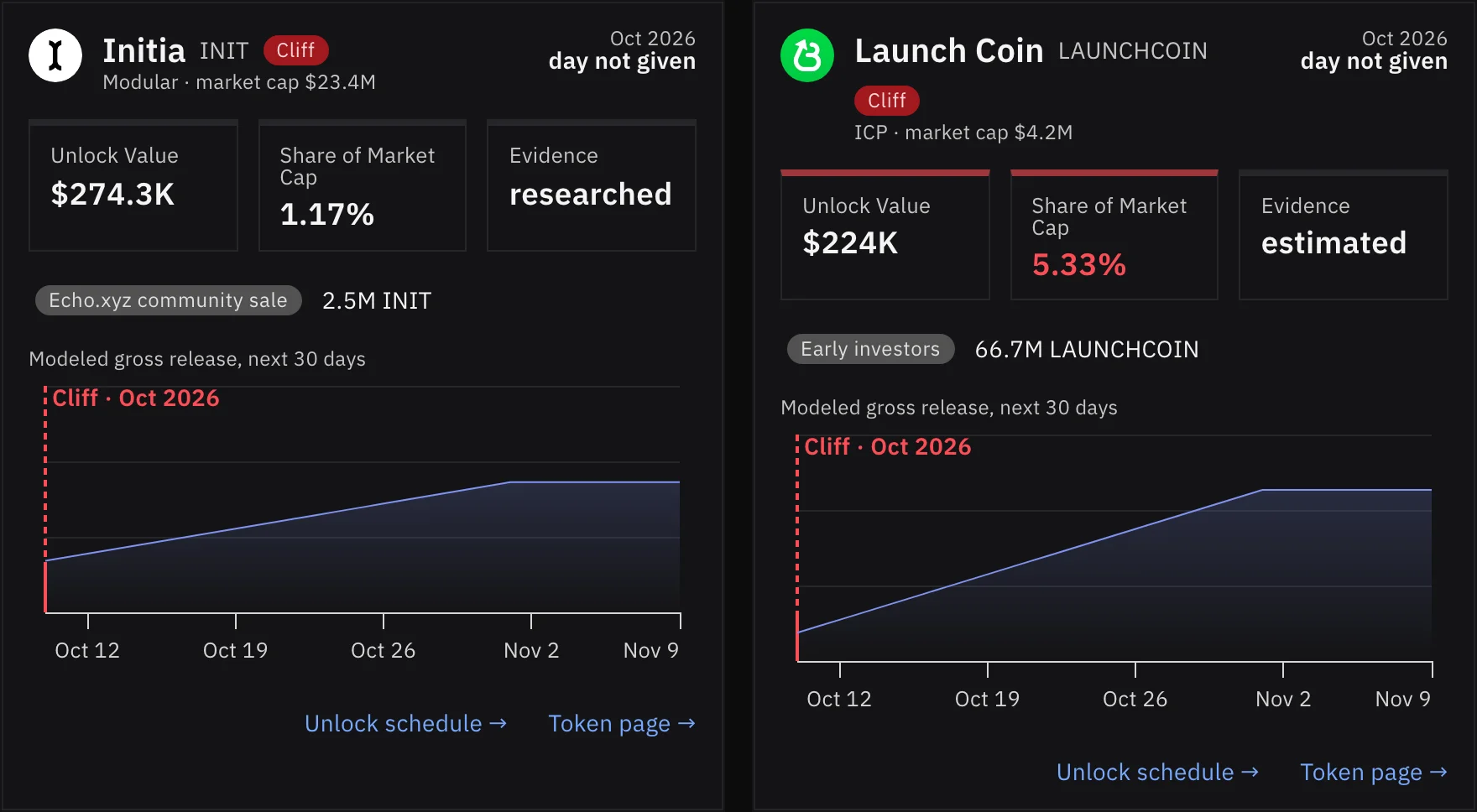
The Largest Cliffs tab shows a card for each large one-time unlock in the period. Each card names the date, the unlock value, its share of market cap, the allocation that unlocks and whether the schedule is researched or estimated, with a small chart of the release. Links lead to the token's unlock schedule and token page.
Issuance
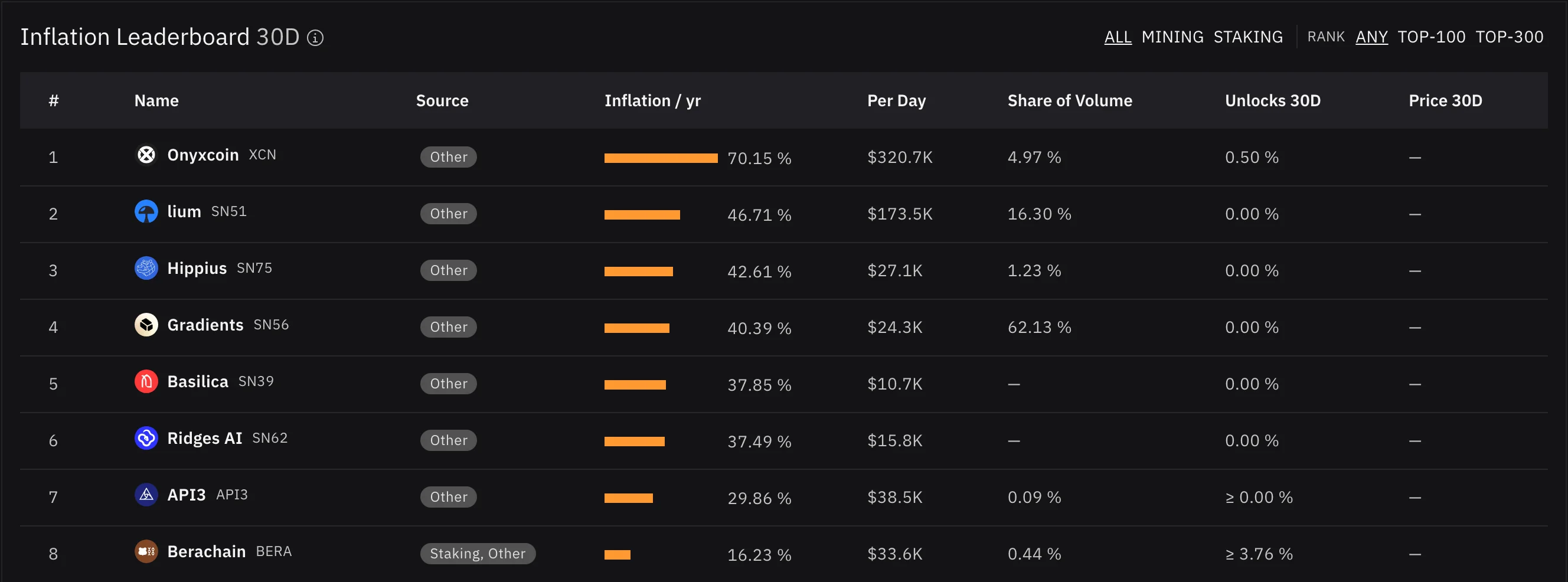
Not all new supply comes from unlocks: many tokens mint new tokens as mining or staking rewards. The Issuance tab shows this side of supply:
- Key Numbers: New supply per day, the weighted inflation, the highest inflation, and how many tokens have an issuance forecast
- Charts: Inflation against the price change of the period, issuance volume over time, or inflation against each token's share of trading volume
- Top Sectors by Issuance: The sectors that add the most new supply
- Inflation Leaderboard: Every issuing token ranked by its yearly inflation, filterable by MINING and STAKING
Tokenomics Tab
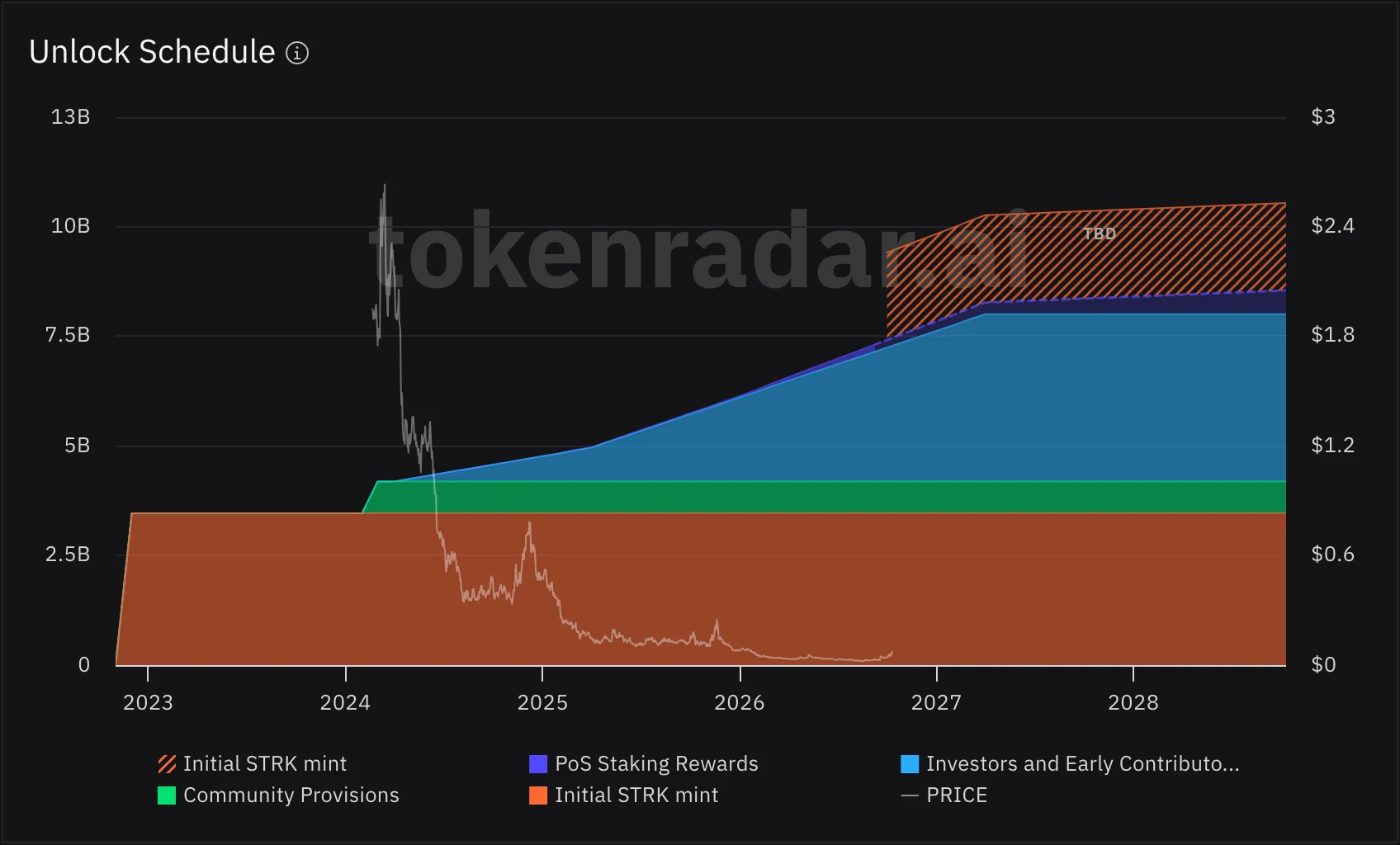
The Tokenomics tab on token pages now shows unlock schedules we research from public sources such as project documents, for more than 500 tokens.
- Unlock Schedule: Every allocation over time with the token's price on the same chart. Supply without a release date yet shows as a TBD block, not as unlocked, and estimated parts, such as future staking rewards, are drawn lighter and marked Estimated in the tooltip
- Net Supply: For tokens that burn part of their supply while they mint, the chart follows the net supply
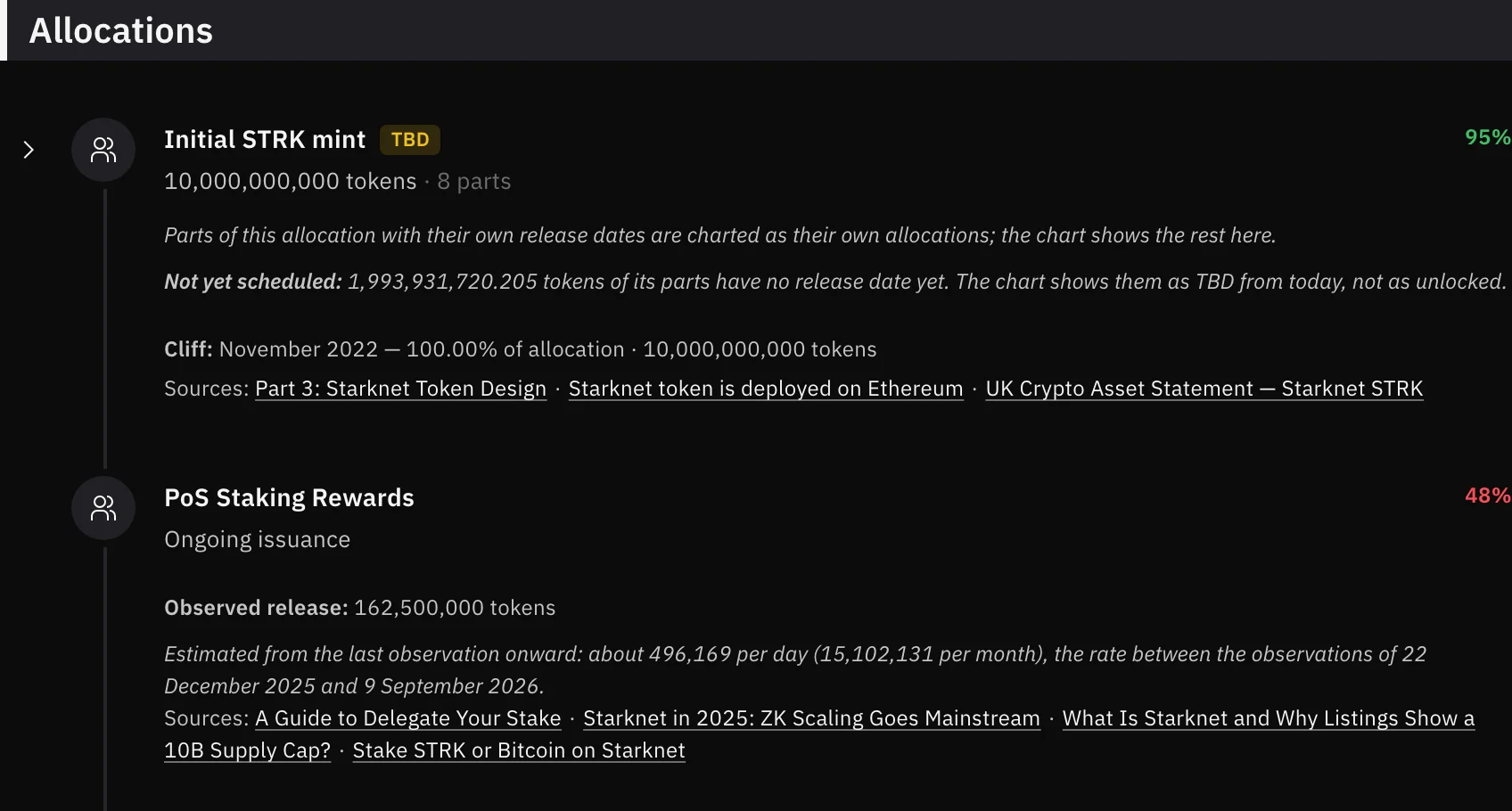
- Allocations: Each allocation with its amount, schedule, parts, confidence and the sources behind it
- Tokenomics Overview: Total and unlocked supply, unlock progress, genesis date, when the token is fully unlocked, and the number of allocations
- Assumptions: A plain-language summary of the schedule and of what is not yet known, with all sources
Unlocks on the Dashboard and Home Page
- Dashboard: A new Upcoming Unlocks tile lists the five largest unlocks of the next 30 days and leads to the calendar
- Home Page: The biggest token unlocks of the next 30 days on a timeline, with a link to the unlock calendar
Price Chart
- More History: Zoom out or drag left on the candlestick chart to load older candles
- Live Last Candle: The last candle is the current, still-forming one, so every interval shows the latest price
- Measure Tool: Click the ruler, then two points on the chart, to measure the price change in percent, the number of candles and the time span between them
Improvements and Fixes
- Author Pages: The Activity chart switches between MENTIONS, ACTIVITY and TOTAL, and the Favorite Authors tab shows it too
- Social: Posts from a project's official accounts no longer count as social mentions of its token; they appear under OFFICIAL
- Pricing: Free and Premium side by side in one comparison table, on the pricing page and in the upgrade dialog
- Search: Header search results are ordered by market cap rank, with more room to type
- Weekly News: The weekly news summary covers quieter days with medium-impact stories
- Not Found Pages: Unknown token, sector and blockchain pages now show a clear not-found page
- Phones: Docs and blog pages no longer scroll sideways
We hope Token Unlocks helps you see new supply coming before it reaches the market. Let us know what you think!